
Utoljára frissítve:
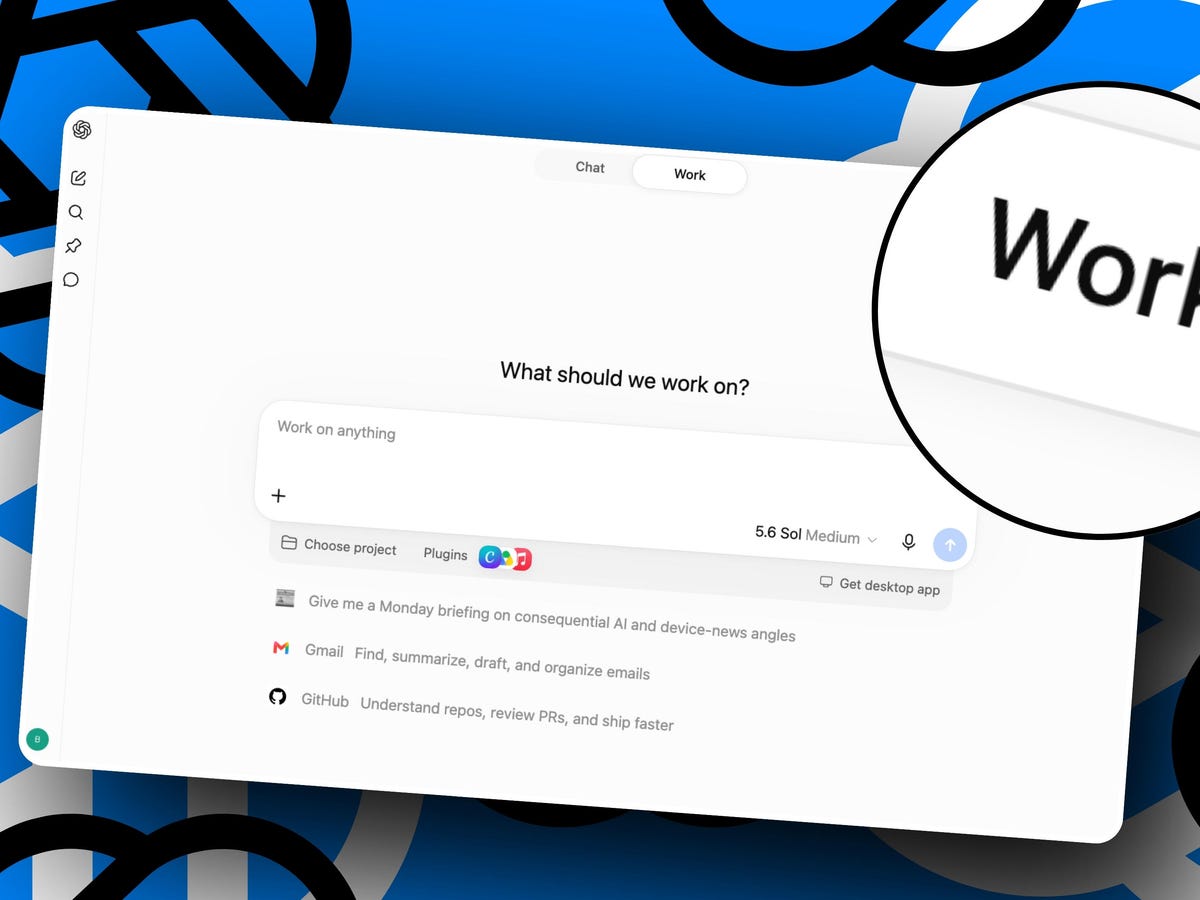
A ChatGPT Work tippek átalakíthatják a mindennapi feladatokhoz való hozzáállásodat, gyakorlati ügynöki AI útmutatót adva az automatizáláshoz, a rendszerezéshez és a munkaterhelés hatékony kezeléséhez. Ahogy a mesterséges intelligencia folyamatosan fejlődik, a ChatGPT Work elsajátítása alapvető készséggé válik azoknak a szakembereknek, akik időt szeretnének megtakarítani és növelni a produktivitásukat.
A hagyományos ChatGPT-vel ellentétben a ChatGPT Work túlmutat a kérdések megválaszolásán — cselekszik is. Legyen szó fájlok rendezéséről, kutatásról vagy összetett munkafolyamatok összehangolásáról, az olyan ügynöki AI, mint a ChatGPT Work, új szintre emeli az automatizálást. Ez a ChatGPT Work bemutató a legjobb tippeket, gyakorlati példákat és részletes útmutatást mutat be, hogy gyorsan és biztonságosan el tudd kezdeni.
Mi az a ChatGPT Work? Az ügynöki AI megértése
Az ügynöki AI olyan mesterségesintelligencia-rendszereket jelöl, amelyek nem csupán feldolgozzák a kéréseket, hanem képesek önállóan feladatok sorozatát is végrehajtani. A ChatGPT Work esetében ez azt jelenti, hogy az AI képes böngészni az interneten, fájlokat kezelni, és minimális input mellett több lépésből álló projekteket végrehajtani, miután beállítottad.
Például, ha megkéred a ChatGPT Worköt, hogy rendezzen el egy dokumentummappát, elemezheti a tartalmukat, átnevezheti a fájlokat, témák szerint kategorizálhatja őket, és a megfelelő könyvtárakba helyezheti át — mindezt állandó felügyelet nélkül. Ez a kéz nélküli megközelítés teszi a ChatGPT Work elsajátítását annyira értékessé az ismétlődő vagy időigényes feladatok egyszerűsítésében.
Eredetileg programozóknak fejlesztették ki, de az olyan ügynöki munkára alkalmas eszközök, mint a ChatGPT Work, gyorsan népszerűvé váltak a nem programozók körében is. Ma már bárki használhatja ezt a technológiát kutatás, adatbevitel, tartalomszervezés és egyebek automatizálására — így sokoldalú társ lehet munkában vagy tanulásban.
Első lépések: a ChatGPT Work beállítása
A ChatGPT Work használatához ChatGPT-fiókra van szükséged. Az eszköz ingyenes és fizetős felhasználók számára is elérhető, de a használati korlátok eltérnek. Az ingyenes felhasználók kipróbálhatják a funkcióit, míg a fizetős csomagok — például a havi 20 dolláros ChatGPT Plus — nagyobb kapacitást kínálnak nagyobb vagy gyakoribb projektekhez.
Erre lesz szükséged a kezdéshez:
- ChatGPT-fiók: Ha még nincs, regisztrálj egy OpenAI-fiókot.
- Asztali alkalmazás vagy böngésző: A ChatGPT Work a ChatGPT webes felületén vagy asztali alkalmazásában érhető el. A helyi fájlokkal kapcsolatos feladatokhoz az asztali alkalmazás szükséges.
- Alapvető engedélyek: Légy körültekintő az engedélyek megadásakor. Kezdd kicsiben, hogy megértsd, hogyan تعامل az AI az adataiddal.
Telepítés vagy bejelentkezés után a chatmező fölött két módot fogsz látni: Chat és Work. Válts Work módra, hogy engedélyezd az ügynöki AI-funkciókat. Mappákat is kiválaszthatsz, hogy rendezetten tartsd a projekteket, és korlátozd az AI műveleteinek hatókörét — ez kulcsfontosságú lépés az adatvédelem és az adatbiztonság kezelésében.
A 10 legjobb ChatGPT Work tipp a hatékonyságért és a biztonságért
A ChatGPT Work előnyeinek maximalizálásához átgondolt megközelítésre van szükség. Ezek a ChatGPT Work tippek segítenek a legtöbbet kihozni az ügynöki AI-ból, miközben elkerülöd a gyakori hibákat:
- Kezdd kicsiben: Egyszerű feladatokkal — például fájlok átnevezésével vagy dokumentumok rendezésével — indulj, mielőtt összetettebb munkafolyamatokra térnél át.
- Korlátozd az engedélyeket: Az AI hozzáférését csak az adott feladathoz szükséges fájlokra vagy mappákra korlátozd. Ez nemcsak az adataidat védi, hanem abban is segít, hogy nyomon tudd követni a műveleteit.
- Ellenőrizd kétszer az eredményeket: Mindig nézd át a kimenetet. Például, ha a ChatGPT Work rendezi a fájlokat, ellenőrizd az új fájlszerkezetet, mielőtt bármit is törölnél az eredetiből.
- Használj egyértelmű promptokat: A konkrét utasítások csökkentik a hibákat. Ahelyett, hogy azt mondanád: „rendezd a fájljaimat”, részletezd a szabályokat — például: „csoportosítsd a PDF-eket téma szerint, és nevezd át őket a tartalmuk alapján.”
- Figyeld az erőforrás-felhasználást: Az ingyenes és fizetős csomagoknak használati korlátai vannak. A havi 20 dolláros csomag esetén körülbelül 20 óra ügynöki munkára számíthatsz. Ennek megfelelően tervezz.
- Bontsd részekre a projekteket: Dolgozz mappákban vagy almappákban, hogy a nagy projektek kezelhetőek és könnyen felügyelhetőek maradjanak.
- Kombináld kézi ellenőrzéssel: Használd az ügynöki AI-t az ismétlődő lépések automatizálására, majd ellenőrizd a munkát a véglegesítés vagy megosztás előtt.
- Fedezd fel a Deep Research módot: Összetett online kutatáshoz a Deep Research mód lehetővé teszi, hogy a ChatGPT Work mélyebbre ásson és átfogó jelentéseket készítsen.
- Próbáld ki nem érzékeny adatokkal: Tanulás közben használj mintafájlokat vagy nem kritikus adatokat a kockázat minimalizálása érdekében.
- Maradj naprakész: Az OpenAI rendszeresen frissíti a funkciókat. Nézd meg az új lehetőségeket vagy az engedélyek változásait, különösen nagyobb alkalmazás- vagy szolgáltatásfrissítések után.
Ha követed ezeket a tippeket, a munkafolyamatod gördülékeny, biztonságos és hatékony marad, miközben felfedezed a ChatGPT Work teljes erejét.
Valódi példa: kutatás automatizálása a ChatGPT Workkel
Egy gyakorlati ügynöki AI útmutató nem lenne teljes egy valós példaszituáció nélkül. Tegyük fel, hogy olyan vezeték nélküli vertikális egereket kutatsz, amelyek két vagy három eszköz között tudnak váltani. Ahelyett, hogy manuálisan ellenőriznéd a terméklistákat, ezt a feladatot átadhatod a ChatGPT Worknek.
Először egy világos, részletes promptot adnál: „Keress olyan vezeték nélküli vertikális egereket az Amazonon, amelyek legalább két eszköz közötti váltást támogatnak, és részesítsd előnyben azokat a modelleket, amelyek három eszköz között tudnak váltani. Készíts egy listát terméknevekkel, linkekkel és a támogatott eszközök számával.”
Ezután az AI böngészi a webet, átnézi a termékleírásokat, kinyeri a releváns adatokat, és rendszerezi őket számodra. Ez a megközelítés legalább egy órányi manuális munkát takarít meg egyetlen kutatási feladatnál, és ugyanez a logika kiterjeszthető versenytárs-elemzésre, iparági trendekre vagy több forrásból származó adatgyűjtésre is.
Így nézhet ki a folyamat leegyszerűsített táblázatban:
| Lépés | Művelet | Eredmény |
|---|---|---|
| 1 | A feladat részletes meghatározása | Az AI megérti a kritériumokat és a hatókört |
| 2 | A ChatGPT Work indítása Work módban | Az AI készen áll a többlépéses műveletek végrehajtására |
| 3 | Az AI böngészi a terméklistákat | Az AI kinyeri a releváns termékspecifikációkat |
| 4 | Az adatok rendszerezése | Átlátható, használható összefoglaló a felhasználónak |
Ez az AI-feladat-automatizálási módszer nemcsak növeli a produktivitást, hanem abban is segít, hogy a felhasználók az ismétlődő manuális munka helyett a stratégiai döntésekre koncentráljanak.
A kapacitás kezelése: ingyenes vs. fizetős ChatGPT Work
A ChatGPT Work elérése több szinten érhető el, mindegyik különböző korlátokkal és kapacitással. E lehetőségek megértése segít kiválasztani a számodra legjobb csomagot, és elkerülni a fennakadásokat kritikus feladatok közben.
Az ingyenes felhasználók az ügynöki AI erejének csak egy korlátozott részéhez férnek hozzá — ez elég a funkciók kipróbálásához vagy kisebb projektekhez. Komolyabb használatra a havi 20 dolláros ChatGPT Plus csomag az arany középút, amely havonta körülbelül 20 órányi ügynöki műveletet biztosít. Az intenzív felhasználók vagy csapatok magasabb szinteket is választhatnak a nagyobb hozzáférésért.
- Ingyenes szint: Ideális a ChatGPT Work kipróbálására, de folyamatos projektekhez korlátozott.
- Plus szint (havi 20 dollár): Rendszeres hozzáférés, elegendő mérsékelt napi használathoz vagy több közepes méretű projekthez havonta.
- Enterprise: Az ár változó, szervezeteknek készült, amelyek állandó, nagy kapacitású hozzáférést és დამატолнительные vezérlési lehetőségeket igényelnek.
Mivel minden feladat más és más AI-erőforrásokat használ, nincs egyetlen pontos mérőszám a használatra. Ha azt veszed észre, hogy a szolgáltatás lelassul vagy nem enged új feladatot indítani, valószínűleg elérted a korlátot. Ezek a korlátok időszakosan visszaállnak, ezért a nagyobb projekteket a felhasználási időablakodhoz igazítsd.
Bevált gyakorlatok a biztonságos és hatékony AI-feladat-automatizáláshoz
Nagy erő nagy felelősséggel jár, különösen akkor, amikor ügynöki AI-val automatizálod a munkát. Íme néhány bevált gyakorlat a ChatGPT Work biztonságos és hatékony használatához:
- Őrizd meg az érzékeny adatok biztonságát: Kerüld a személyes vagy bizalmas fájlok megosztását, hacsak nem szükséges. Először próbáld ki nem érzékeny információkkal.
- Ellenőrizd az AI műveleteit: Mindig nézd át az AI kimenetét, különösen akkor, amikor fájlokat módosít vagy mozgat. Hibák előfordulhatnak, ezért a fontos adataidról legyen biztonsági mentésed.
- Korlátozd a hatókört: Az AI-t csak meghatározott mappákhoz rendeld, ne a teljes meghajtóhoz. Ez csökkenti a véletlen módosítások vagy adatvesztés kockázatát.
- Maradj tájékozott: Kövesd az OpenAI frissítéseit, és olvasd el a kiadási jegyzeteket, hogy tudd, milyen változások befolyásolhatják a ChatGPT Work működését.
- Kommunikálj világosan: Ha csapatban dolgozol, mindenki értse, hogyan használják az AI-t, és milyen engedélyei vannak.
Ezeknek a gyakorlatoknak a betartása biztosítja, hogy a ChatGPT Work-kel szerzett tapasztalatod egyszerre legyen eredményes és biztonságos, miközben egyre összetettebb feladatokat automatizálsz.
Gyakran ismételt kérdések
Mi a fő különbség a ChatGPT és a ChatGPT Work között?
A ChatGPT a kérdések megválaszolására és szövegek létrehozására összpontosít, míg a ChatGPT Work ügynöki feladatokat is végre tud hajtani — például böngészik a weben, fájlokat kezel, és több lépésből álló projekteket hajt végre. A ChatGPT Work cselekvéseket automatizál, nem csak információt ad.
Hogyan szabályozhatom, hogy a ChatGPT Work mit érhet el?
A ChatGPT Work használatakor mindig add meg, mely fájlokkal vagy mappákkal dolgozhat. Használd a mappaválasztó eszközt Work módban a hozzáférés korlátozására. Kerüld az általános engedélyek megadását, és szükség szerint állítsd be projektenként.
Biztonságos a ChatGPT Work érzékeny üzleti adatokhoz?
A ChatGPT Work annyira biztonságos, amennyire az általad megadott engedélyek. Érzékeny projektek esetén korlátozd a hozzáférést csak a szükséges fájlokra, és mindig ellenőrizd a kimenetet, mielőtt adatot törölnél vagy megosztanál. Jó ötlet lehet másolatokkal dolgozni az eredetik helyett, ha lehetséges.
Hogyan működnek a használati korlátok a ChatGPT Work esetében?
Az ingyenes felhasználók korlátozott hozzáféréssel rendelkeznek az ügynöki műveletekhez, míg a fizetős csomagok, mint a ChatGPT Plus (havi 20 dollár), nagyobb kapacitást kínálnak. Nincs pontos használati mérőszám, mivel az erőforrás-felhasználás a feladat összetettségétől függ. Ha eléred a korlátot, a használat időszakosan visszaáll.
Használhatom a ChatGPT Worköt kódolási feladatokra?
Igen. A ChatGPT Work, amely az olyan ügynöki kódolási eszközökből fejlődött ki, mint a Codex, segíthet automatizálni a kódolási munkafolyamatokat, refaktorálni a kódot és kezelni a programozási projekteket. Technikai és nem technikai feladatokhoz egyaránt hasznos.
Következtetés
A ChatGPT Work tippek elsajátítása egy új szintű hatékonyságot nyit meg, lehetővé téve az ismétlődő feladatok automatizálását, a projektek kezelését és a mélyreható kutatást minimális erőfeszítéssel. Ha követed ezt az ügynöki AI útmutatót, képes leszel leegyszerűsíteni a munkafolyamatodat, időt megtakarítani, és előnyben maradni az automatizálás korában. Készen állsz arra, hogy a produktivitásodat a következő szintre emeld? Próbáld ki a ChatGPT Worköt még ma, és nézd meg, milyen zökkenőmentesen illeszkedhet az ügynöki AI a mindennapi rutinodba.


Egy válasz