The Eufy C220 smart lock has stormed onto the scene as one of the most affordable ways to add secure, fingerprint-based entry to your front door. For anyone tired of juggling keys, worrying about lost copies, or missing out on the convenience of a connected home, this smart lock under $99 offers a powerful alternative to traditional deadbolts.
Did you know that nearly 40% of homeowners have experienced being locked out at least once in the past year? With the Eufy Security C220, you can say goodbye to frantic key hunts and unexpected lockouts. What makes this biometric door lock so attractive, and is it really a better value than options twice the price?
What Sets the Eufy C220 Smart Lock Apart?
The Eufy C220 smart lock stands out in a crowded market, not just because of its price tag—now available for just $98.48, down from $169.99—but also for the sheer number of features packed into its compact frame. Many smart locks with fingerprint access cost upwards of $150, but the C220 brings secure biometric technology to budget-conscious buyers.
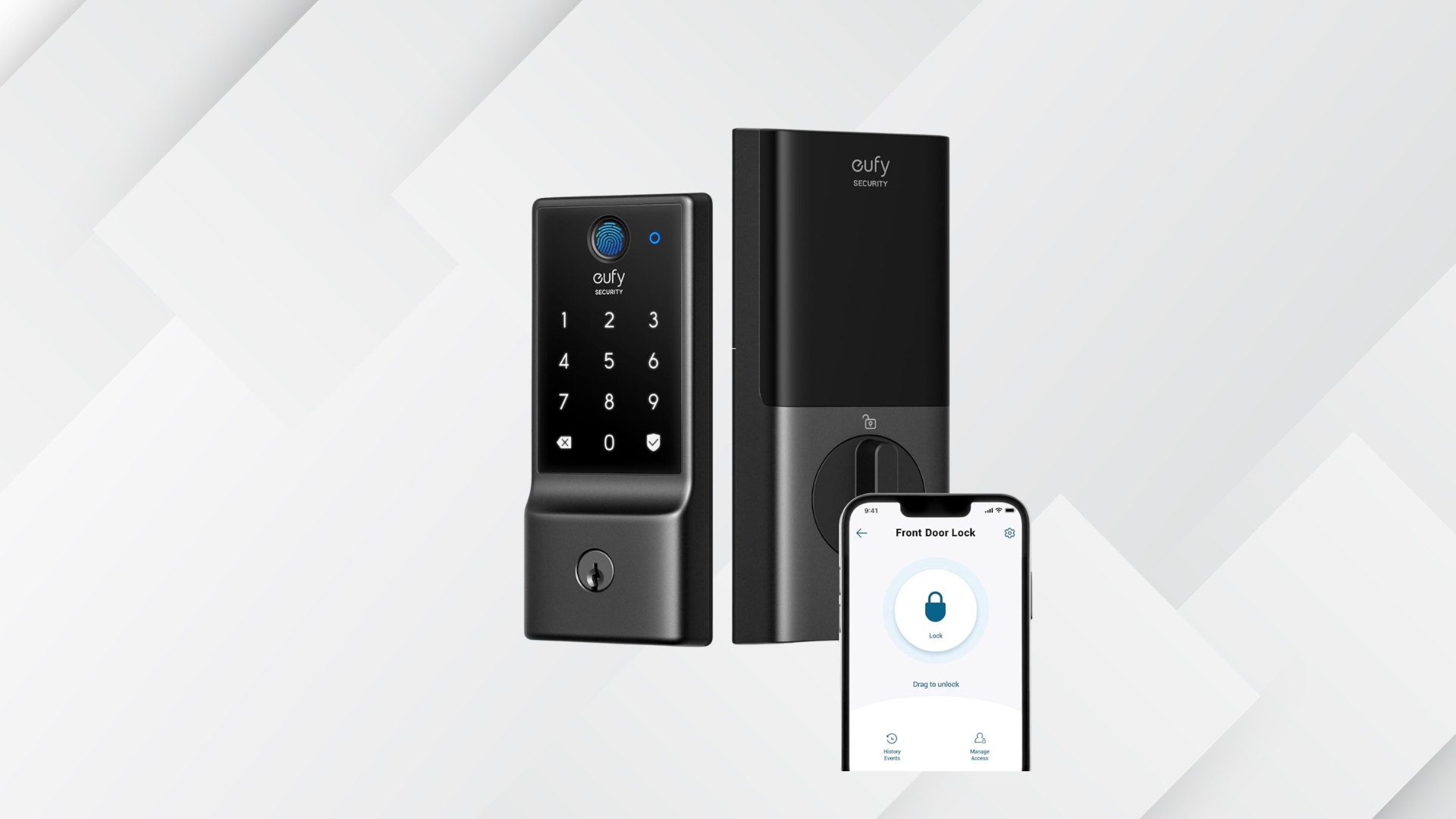
Fingerprint door lock technology is at the heart of the C220 experience. The high-precision sensor sits at the top of the lock, allowing users to unlock their front door in less than one second with a single touch. With support for up to 50 registered fingerprints, the C220 makes it easy for families, roommates, or frequent guests to gain access without the hassle of making new keys.
Beyond fingerprints, this keyless entry lock offers multiple access methods to suit every situation. Whether you’re welcoming a friend who doesn’t have the app or your phone’s out of battery, the C220 has you covered with:
- PIN code entry via illuminated keypad
- Bluetooth unlocking from your smartphone
- Traditional key slot as a backup
- Voice control integration with Alexa, Google Assistant, and Siri
By supporting these options, the Eufy Security lock ensures you’re never locked out, no matter the circumstances.
Premium Features at a Budget Price
Most smart locks under $99 cut corners on durability or battery life, but the Eufy C220 smart lock delivers features typically found in more expensive models. The lock is certified to BHMA Grade 3 standards, guaranteeing it can withstand over 100,000 lock and unlock cycles. This means daily use for years, even in busy households.
Battery life is another standout. Eufy engineered the C220 for low power consumption, so you get up to eight months of runtime on a single set of AA batteries (included in the box). This eliminates the need for frequent battery changes and reduces the risk of the lock dying unexpectedly.
When it comes to weather resistance, the C220 doesn’t fall short. Thanks to its IP53 waterproof rating, the lock shrugs off rain, dust, and temperature fluctuations—ideal for front doors exposed to the elements. The physical key slot remains accessible if you ever need a manual backup in harsh conditions.
Smart Security for Peace of Mind
Security is the main reason many people switch to smart locks, and the Eufy C220 offers several features that help keep intruders at bay. Auto-lock is a popular one: after a customizable interval (as short as 10 seconds or as long as 3 minutes), the door will automatically relock, preventing accidental entry if someone forgets.
The C220 also includes tamper detection and alerts. If someone attempts to force the lock or enters the wrong PIN multiple times, the device will sound a loud alarm and send a notification to your phone via the Eufy Security app. These proactive measures add a layer of defense that traditional deadbolts don’t provide.
Privacy matters, too. All fingerprint data is stored locally on the device, not in the cloud, minimizing the risk of personal information being exposed in a data breach. This is a significant advantage for privacy-conscious users interested in biometric door locks.
Easy Installation and Everyday Use
Many buyers worry that upgrading to a smart lock means hiring a pro or dealing with complicated wiring. The Eufy C220 smart lock is designed for fast DIY installation, fitting most standard US deadbolts in about 15 minutes with just a screwdriver. There’s no need to drill new holes or mess with your existing door hardware.
User management is simple through the Eufy Security app. You can add or delete fingerprints and PIN codes, create temporary access for visitors or service personnel, and view a detailed log of lock activity. The app works over Bluetooth, so you don’t need a Wi-Fi bridge or extra hub for basic features.
Integration with smart assistants is seamless. Once connected, you can ask Alexa or Google Assistant to lock or check the status of your door, making it easy to secure your home with a voice command as you head out.
Comparing the Eufy C220 to Competing Smart Locks
To understand the value of the Eufy C220, it helps to compare it directly to popular alternatives in the same price range. Here’s how it stacks up against two common competitors:
| Feature | Eufy C220 | Wyze Lock Bolt | Ultraloq U-Bolt |
|---|---|---|---|
| Price | ~$98 | ~$70 | ~$120 |
| Fingerprint Access | Yes | Yes | Yes |
| Smart Assistant Support | Alexa, Google, Siri | No | Alexa, Google |
| Battery Life | Up to 8 months | ~12 months | ~6 months |
| Weather Resistance | IP53 | IPX5 | IP65 |
The C220’s standout features—especially voice assistant integration and robust build—set it apart from models that may cost more or cut corners on connectivity.
Best Use Cases: Who Benefits Most from the Eufy C220?
This smart lock appeals to a wide range of homeowners and renters. Families with children can program each family member’s fingerprint for instant access. Airbnb hosts or landlords can issue PIN codes to guests and revoke them after checkout, improving security and convenience.
For busy professionals, the ability to unlock the door when your hands are full is a true advantage. No more struggling with grocery bags while searching for keys—just a quick fingerprint scan and you’re inside. Elderly residents or anyone with dexterity challenges may also find the biometric access far simpler than traditional locks.
Security-conscious buyers will appreciate the tamper alerts, auto-lock, and local fingerprint storage. Anyone looking for a smart lock under $99 with features typically found in $150+ models will find the Eufy C220 an ideal choice.
- Key Takeaways:
- Fingerprint unlock in under one second
- Multiple entry methods: PIN, Bluetooth, key, voice assistant
- Up to 8 months battery life
- BHMA Grade 3 durability and IP53 weatherproofing
- Auto-lock and tamper alerts for added security
How to Get the Most from Your C220 Smart Lock
To make sure your Eufy Security lock deal delivers on its promise, follow a few best practices:
- Register several fingerprints for each user—thumbs and index fingers on both hands—to improve reliability.
- Set up auto-lock with a delay that matches your daily routine. Most people find 30-60 seconds ideal.
- Schedule monthly battery checks in the app. The C220 will alert you if power gets low, but preventive checks help avoid surprises.
- Keep your app updated to benefit from the latest security patches and features.
- Integrate with your preferred smart assistant for even easier control.
Many users find that sharing a temporary PIN with cleaners, delivery people, or dog walkers makes life easier and maintains security. Removing expired codes is easy through the Eufy app.
Frequently Asked Questions
How does the Eufy C220 smart lock handle power outages or dead batteries?
The C220 runs on AA batteries and retains all data if the power runs out. You can always use the included physical key to unlock the door if the batteries die before you replace them.
Can I install the Eufy C220 on any door?
The Eufy C220 fits most standard US doors with existing deadbolts. It requires a door thickness of 35-55mm and a backset length of either 60mm or 70mm. No wiring or drilling is needed for installation.
Is the fingerprint sensor reliable in wet or cold weather?
The IP53 waterproof rating protects the sensor from rain and dust. While the sensor works reliably in most weather, very wet or dirty fingers may reduce recognition accuracy—using the keypad or app is a handy backup.
Can multiple users have access to the same lock?
Yes, you can register up to 50 individual fingerprints and set multiple PIN codes. This makes it easy for families, roommates, or frequent guests to access the home without sharing keys.
Does the lock require Wi-Fi to work?
No, basic features like fingerprint unlock and Bluetooth app control work without Wi-Fi. For remote control and integration with smart assistants, you’ll need to connect the lock to your home Wi-Fi network.
Conclusion
The Eufy C220 smart lock brings fingerprint door access, keyless entry, and robust smart features to the under-$99 price point—without sacrificing security or convenience. For anyone looking to upgrade their home’s security and simplify daily life, this Eufy Security lock deal is one of the year’s best. Ready to ditch your keys? Check if the C220 is in stock and elevate your entryway with true smart access today.